MAC Address — Complete Guide
Everything you need to know about MAC addresses: what they are, how they are structured, all supported formats, IEEE block types, how OUI lookup works, and how to find a MAC address on any device or operating system.
A MAC address (Media Access Control address) is a unique identifier assigned to a network interface controller (NIC) by the manufacturer. It is a 48-bit hardware address that permanently identifies a device at the Data Link Layer (Layer 2) of the OSI model. Every device that connects to a network — Ethernet, Wi-Fi, Bluetooth, or any other interface — has at least one MAC address.
Unlike IP addresses which are assigned dynamically and can change, a MAC address is burned into the hardware at the factory. It is used by network switches to direct traffic within a local network (LAN), by DHCP servers to assign consistent IP addresses, and by network administrators for device identification and access control.
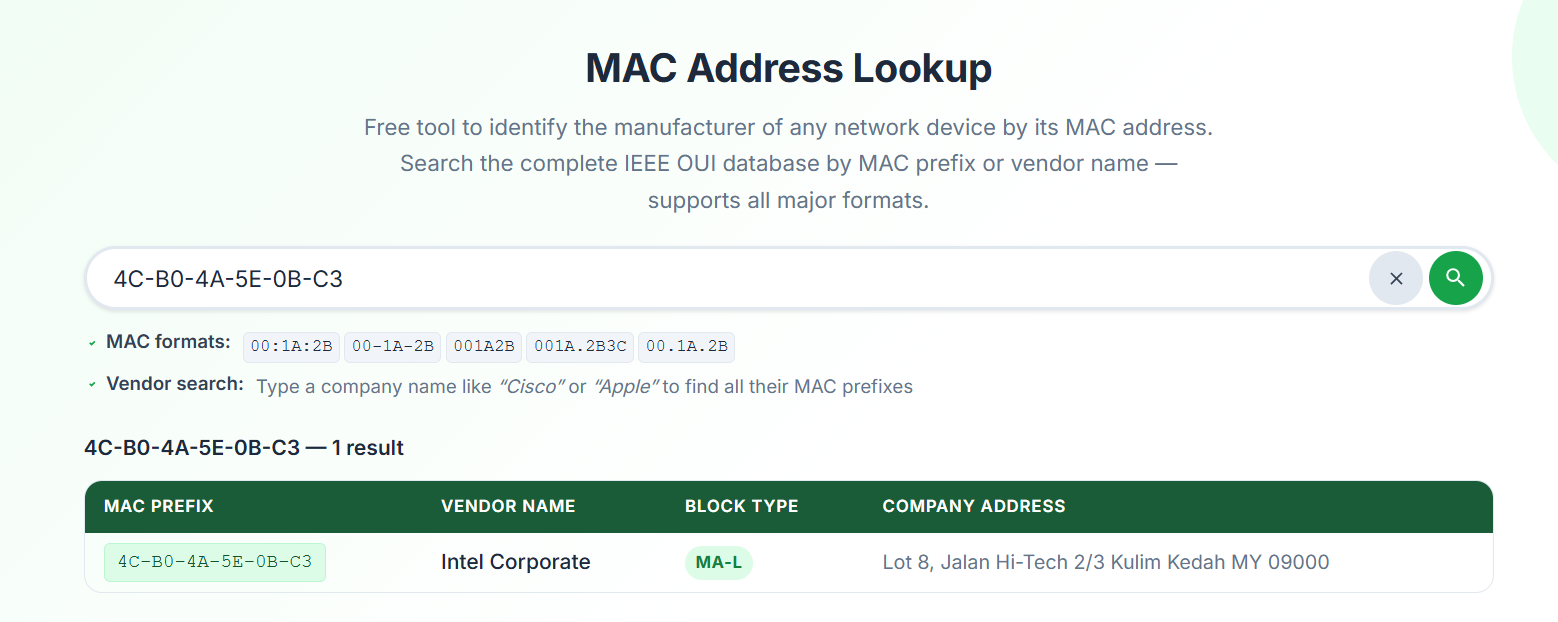
Fig 1. Searching 4C-B0-4A-5E-0B-C3 on macaddresslookups.com — the tool extracts the OUI 4C:B0:4A and identifies the vendor instantly.
Key Facts
- Length: 48 bits — 6 bytes — 12 hexadecimal characters
- Layer: OSI Layer 2 (Data Link Layer) — used within a local network
- Scope: Local — not routed across the internet (unlike IP addresses)
- Assignment: Assigned by manufacturers, registered with IEEE
- Also called: Hardware address, physical address, burned-in address (BIA), Ethernet address
A MAC address is 48 bits long, written as 12 hexadecimal digits. It is divided into two equal halves of 24 bits each. The first half identifies the manufacturer (OUI), and the second half is assigned by the manufacturer to uniquely identify each device.
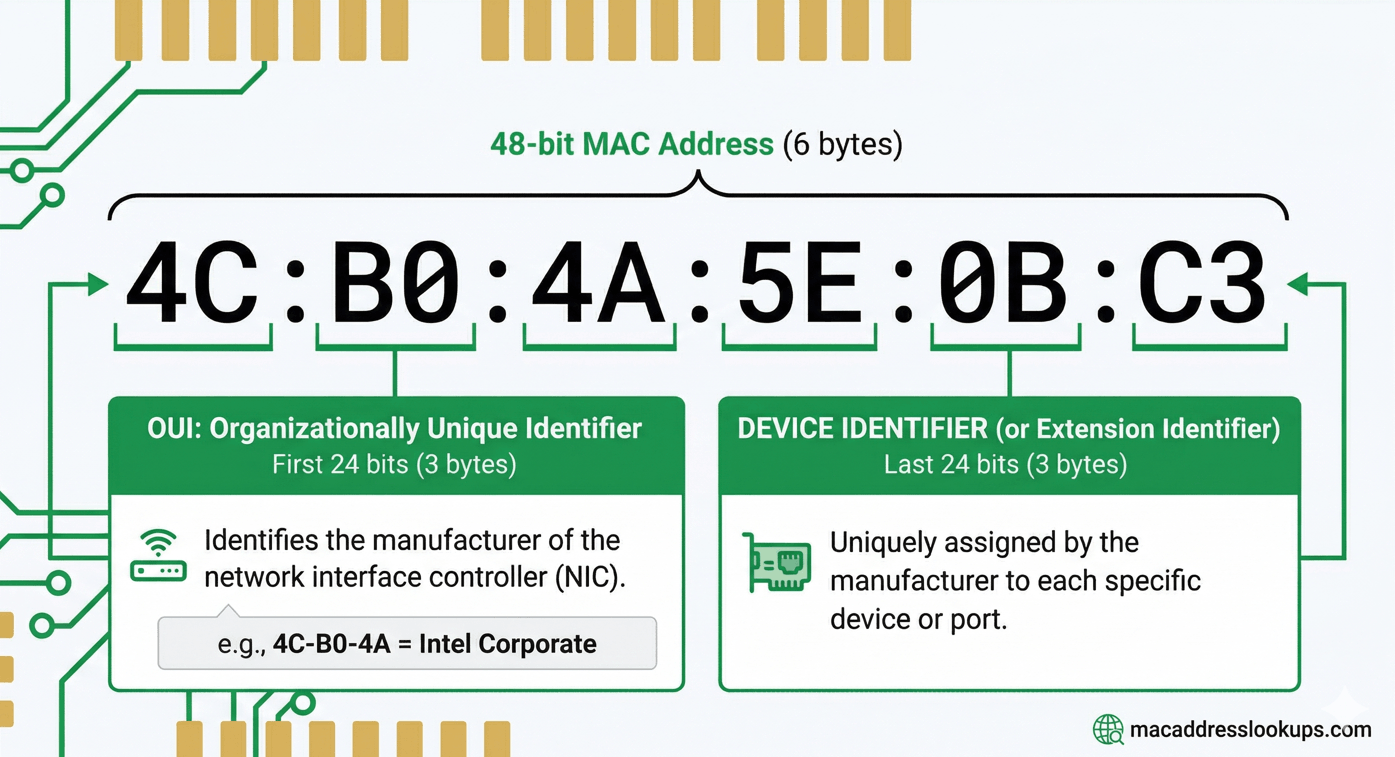
Fig 2. MAC address structure — first 24 bits (OUI) identify the manufacturer, last 24 bits identify the specific device.
Example: 4C:B0:4A:5E:0B:C3 — OUI 4C:B0:4A identifies vendor • 5E:0B:C3 identifies the specific device
Special Bits in the First Byte
The first byte of a MAC address contains two special flag bits that define how the address behaves on the network:
Bit 0 (LSB) — Unicast / Multicast flag
- 0 = Unicast address — sent to a single specific device
- 1 = Multicast address — sent to a group of devices (e.g.
01:00:5E:xx:xx:xxfor IPv4 multicast)
Bit 1 — Globally Unique / Locally Administered flag
- 0 = Globally unique (OUI enforced) — assigned by manufacturer, registered with IEEE
- 1 = Locally administered — manually set by a network admin or OS (MAC spoofing)
Supported MAC Address Formats
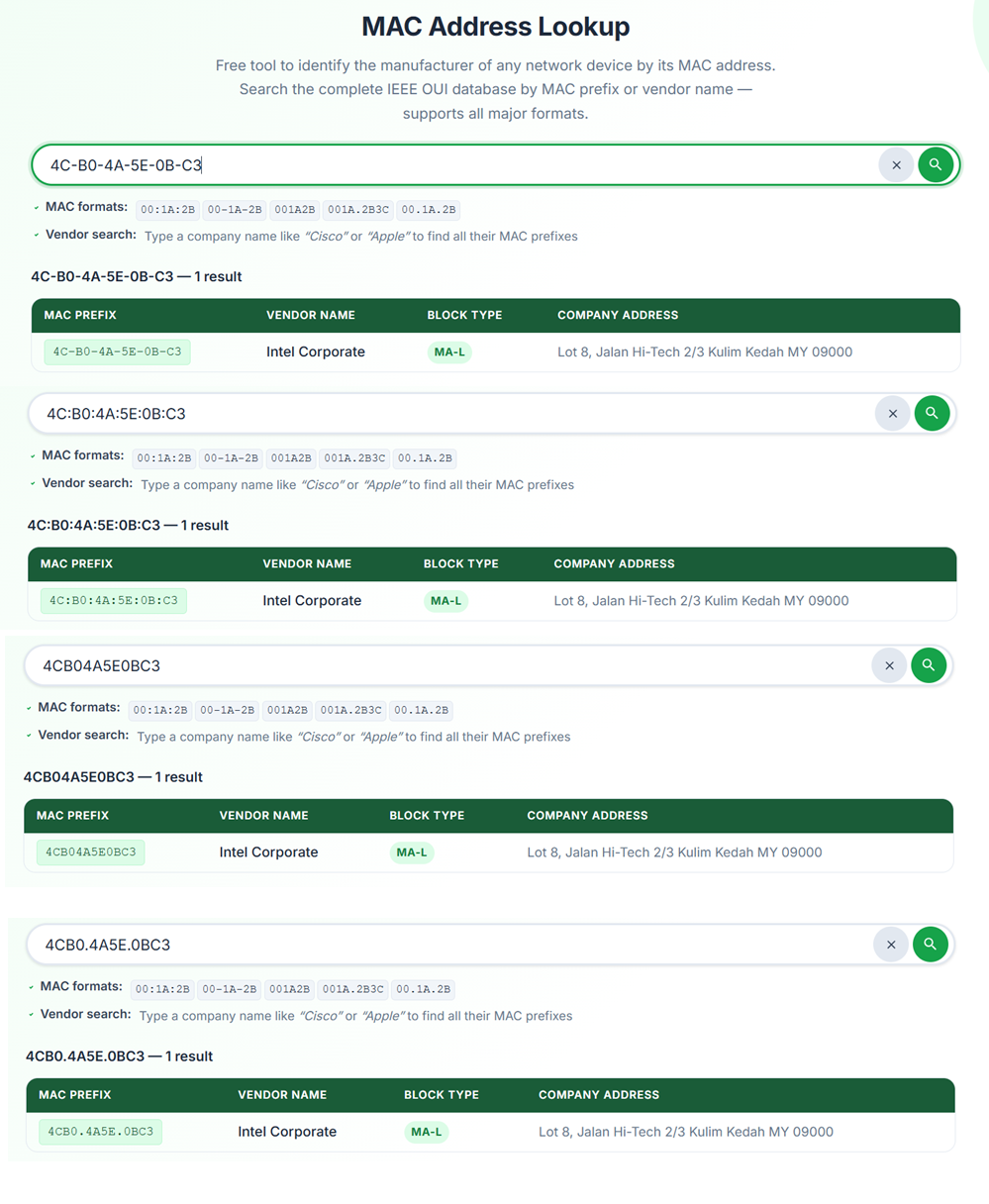
Fig 3. All common MAC address formats — our tool accepts all of these automatically.
| Format | Example | Used By |
|---|---|---|
| Colon-separated | 4C:B0:4A:5E:0B:C3 | Linux, macOS, Android, iOS |
| Hyphen-separated | 4C-B0-4A-5E-0B-C3 | Windows |
| Plain hex (no separator) | 4CB04A5E0BC3 | Databases, some CLI tools |
| Cisco dot notation | 001A.2B3C.4D5E | Cisco IOS, network equipment |
| Dot-per-byte | 00.1A.2B.3C.4D.5E | Some legacy systems |
| OUI prefix only | 4C:B0:4A | Vendor lookups, OUI search |
Our MAC Address Lookup tool accepts all of the formats above automatically — no manual conversion needed.
An OUI (Organizationally Unique Identifier) is the first 24 bits (3 bytes) of a MAC address. It identifies the organisation — typically the hardware manufacturer — that registered that block of MAC addresses with the IEEE. When you perform an OUI lookup, you are matching those first 3 bytes against the IEEE registry to find who owns that block.
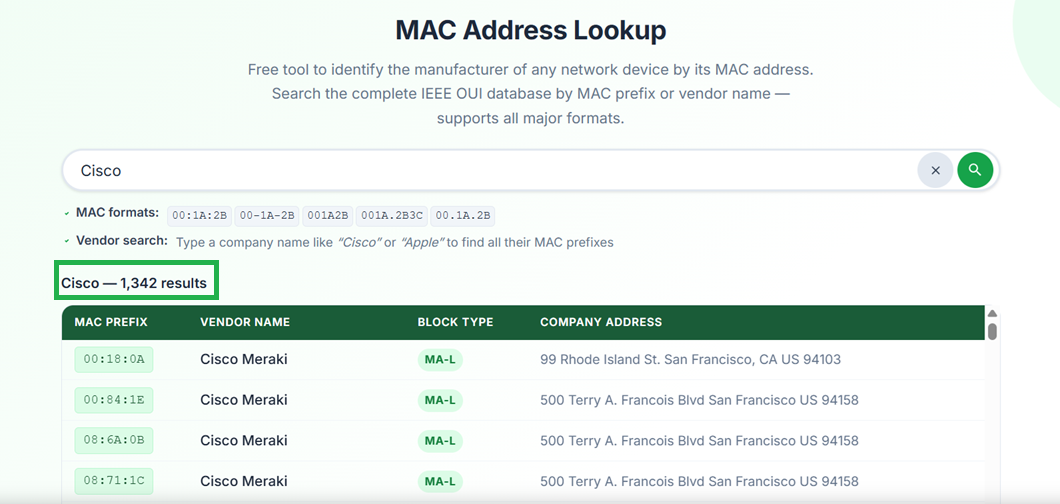
Fig 4. Searching by vendor name — type a company name like “Cisco” or “Apple” to find all their registered MAC prefixes.
How OUI Lookup Works — Step by Step
- Step 1: Take the first 3 bytes (6 hex characters) of the MAC address — e.g.
4C:B0:4Afrom4C-B0-4A-5E-0B-C3 - Step 2: Search the IEEE OUI registry for that prefix
- Step 3: The registry returns the registered company name and address
- Step 4: This tells you the manufacturer of the network interface — not necessarily the device brand
Important note: The OUI identifies the manufacturer of the network chip or interface card, not always the brand of the final device. For example, a Dell laptop might contain an Intel Wi-Fi chip — the MAC address would show Intel as the vendor, not Dell.
You can also search by vendor name to find all MAC prefixes registered to a company. Try our vendor name search — type "Cisco", "Apple", "Samsung" or any manufacturer name.
The IEEE Registration Authority assigns MAC address blocks in different sizes. The block type determines how many MAC addresses a company receives and the length of their prefix. There are five block types in the IEEE registry.
- Prefix length: 24 bits (3 bytes)
- Addresses: ~16.7 million (2²⁴) per block
- Used by: Large manufacturers — Cisco, Apple, Samsung, Intel
- Example:
00:00:0C→ Cisco Systems, Inc.
- Prefix length: 28 bits (3.5 bytes)
- Addresses: ~1 million (2²⁰) per block
- Used by: Mid-sized manufacturers and vendors
- Example:
C8:5C:E2:7→ Mid-size vendor
- Prefix length: 36 bits (4.5 bytes)
- Addresses: 4,096 (2¹²) per block
- Used by: Small vendors, IoT device makers, startups
- Note: Most common for new small allocations today — replaced IAB in 2014
- Prefix length: 24 bits
- Purpose: Protocol contexts only — not for Ethernet MAC address assignment
- Used in: IEEE 802.1 protocol identifiers and similar standards
- Note: Very limited use — only a small number of CID assignments exist
- Prefix length: 36 bits
- Addresses: 4,096 (2¹²) per block
- Status: No longer issued — superseded by MA-S in 2014
- Note: Existing IAB assignments remain valid and are in our database
Search our database by block type — use our lookup tool and the Block Type column in results identifies which IEEE assignment type each vendor uses.
Every operating system has a different way to display the MAC address. Below are the exact steps for each major platform.
Windows
- Open Command Prompt (cmd)
- Type:
ipconfig /all - Look for "Physical Address"
- Or: Settings → Network → adapter Properties
macOS
- System Settings → Network
- Select your interface → Details
- Click the Hardware tab
- Or Terminal:
ifconfig en0 | grep ether
Linux
- Terminal:
ip link show - Or:
ifconfig - Look for "link/ether" value
- Or:
cat /sys/class/net/eth0/address
Android
- Settings → About Phone
- Tap Status
- Look for Wi-Fi MAC address
- Note: Android 10+ may show randomised MAC
iPhone / iOS
- Settings → General → About
- Scroll to Wi-Fi Address
- Note: iOS 14+ uses private (randomised) Wi-Fi MAC by default
Cisco Switch / Router
show mac address-table- Or:
show arpfor IP-to-MAC mapping - Or:
show interfacesfor interface MAC
MAC addresses and IP addresses are both used to identify devices on a network, but they work at different layers and serve different purposes.
| Feature | MAC Address | IP Address |
|---|---|---|
| OSI Layer | Layer 2 — Data Link | Layer 3 — Network |
| Length | 48 bits (12 hex chars) | 32 bits (IPv4) / 128 bits (IPv6) |
| Assignment | Manufacturer (permanent) | Network / DHCP (dynamic) |
| Scope | Local network (LAN) only | Global (internet-routable) |
| Changes | Permanent (can be spoofed) | Can change each connection |
| Format | 4C:B0:4A:5E:0B:C3 | 192.168.1.1 |
| Used for | Switch forwarding, ARP | Routing across networks |
How They Work Together
- When data travels across the internet, the IP address is used for routing between networks.
- When data arrives at the local network, ARP (Address Resolution Protocol) maps the IP address to the device's MAC address for final delivery.
- Every hop on the local network uses MAC addresses — IP addresses are only relevant for routing between networks.
Although a MAC address is burned into hardware, it is possible to change (spoof) the MAC address through software. Modern operating systems also implement MAC address randomisation as a privacy feature.
MAC Address Randomisation (Privacy)
- iOS 14+: Uses a randomised MAC per Wi-Fi network by default — prevents tracking across networks
- Android 10+: Randomised MAC per network by default
- Windows 10+: Optional random hardware address per network
- Effect on lookups: A randomised MAC will not match a real vendor — it will show no result or an incorrect vendor
Security Note
- A MAC address lookup result is not definitive proof of hardware identity — the address may have been spoofed
- Use MAC lookups as one of several diagnostic tools, not as sole evidence
- For network security, combine MAC inspection with other identification methods
Ready to Look Up a MAC Address?
Use our free tool to identify any network device manufacturer instantly from its MAC address or OUI prefix.